Photo & Video Cleaner · iPhone + iPhone Duo

Keep or toss.
Free gigabytes in minutes.

One photo or video in your hand. Nothing vanishes by accident.

Swipe right to keep. Swipe left and it waits in Trash with its exact size. Clear 4K videos (largest first), burst duplicates, screenshots, and months — instantaneously offline or online, with zero ads.

  • 30 / day free swipes forever
  • 0 ms instant offline swipe load
  • No ads zero trackers or accounts
  • $19.99/yr 7-day trial · or $34.99 once
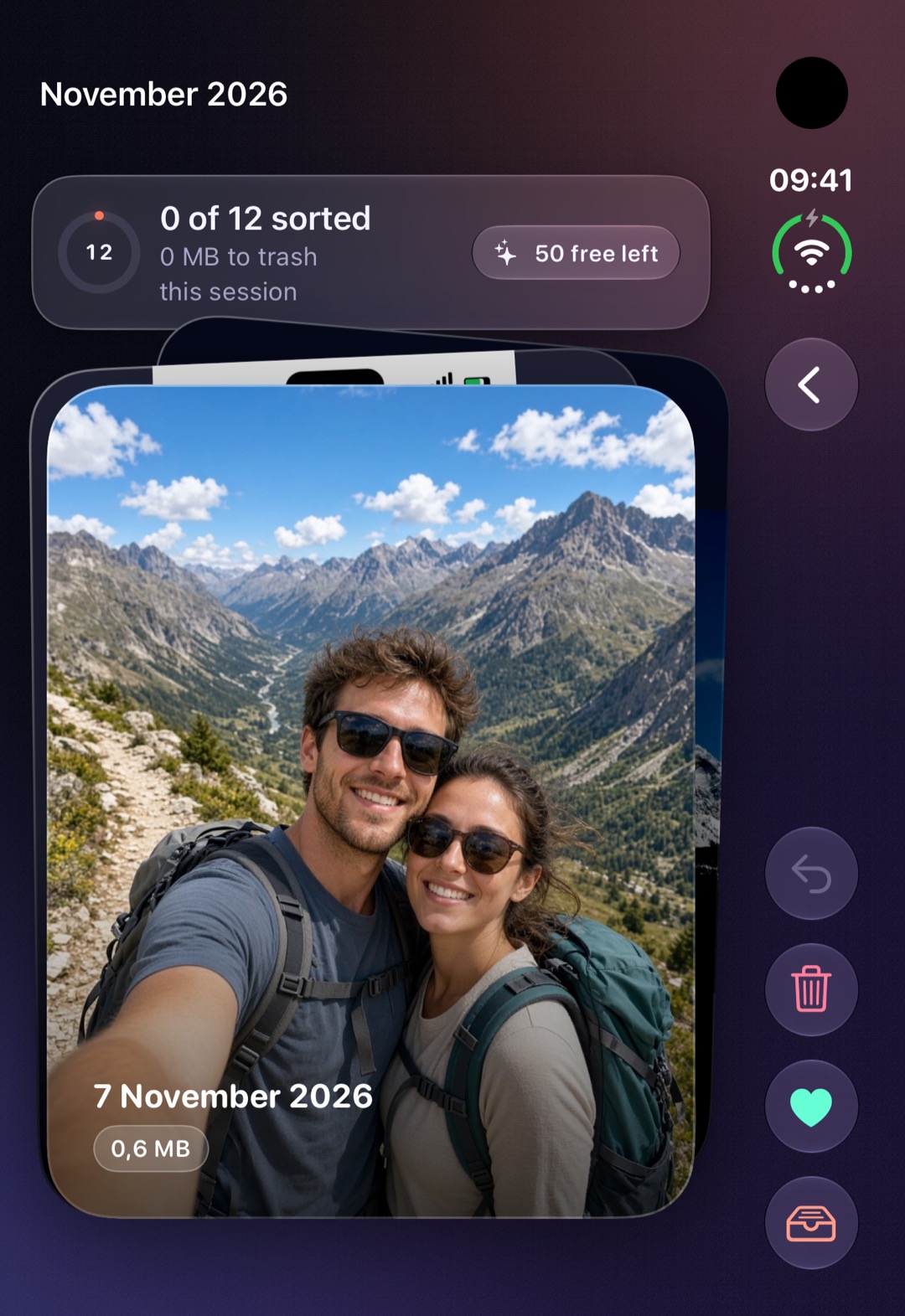
iPhone Duo folded outer display showing Spacely with a large photo card and right-hand vertical swipe controls.
Folded iPhone Duo · Outer Screen
iPhone showing a Spacely photo card tilted right mid-swipe with a glowing green KEEP stamp.
iPhone One-Hand 3D Swipe Deck
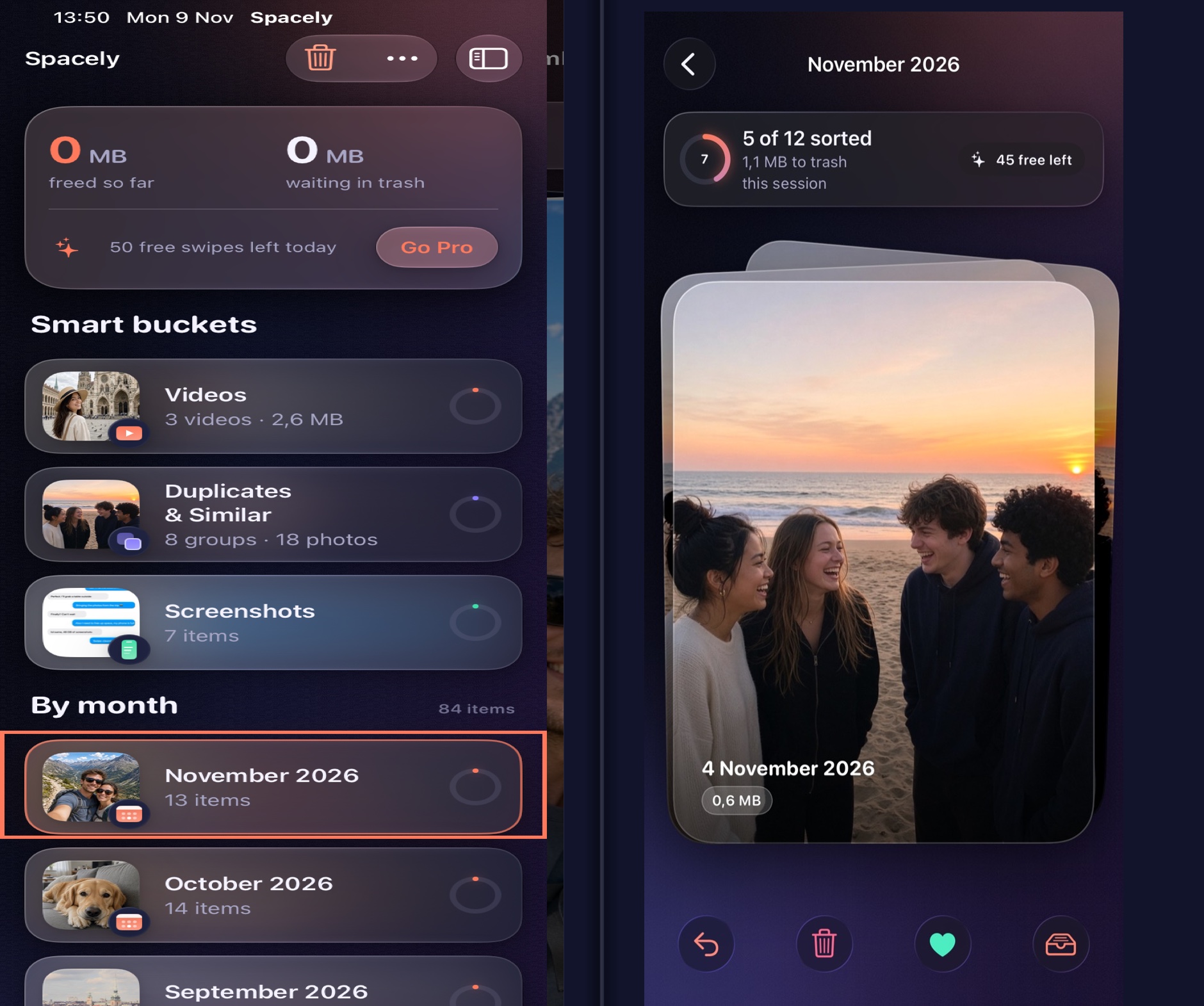
iPhone Duo unfolded inner display showing Smart Buckets (Videos, Duplicates, Screenshots, By Month) on the left screen and the active Swipe Deck on the right screen.
Unfolded iPhone Duo · Dual-Screen Split
Instantaneous Offline & Online

Reads local thumbnails immediately — even in Airplane Mode. iCloud syncs deletions later.

Video Cleaner Built In

Ranks videos largest-first with instant local preview, duration, and exact MB/GB size.

Safe Two-Step Trash

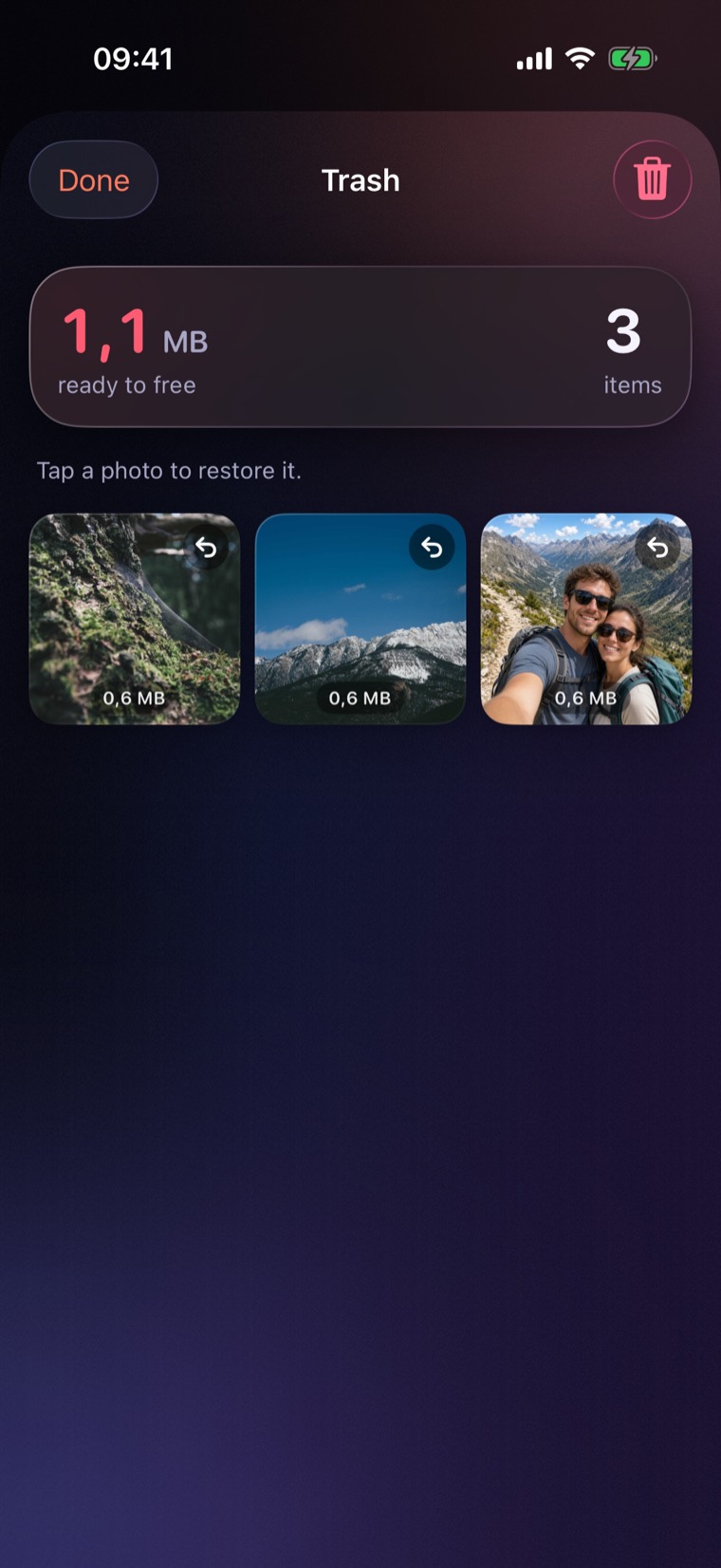
Left swipes wait in Trash. Tap any photo or video to restore before iOS confirms deletion.

Zero Cloud Uploads

No account, no analytics SDKs, no remote servers. Your camera roll stays on your device.

Adaptive Hardware Design

iPhone. iPhone Duo folded. iPhone Duo unfolded.

Spacely never hardcodes screen sizes. Every layout adapts live to your posture — from a one-handed iPhone on the train, to the wide outer screen of a folded iPhone Duo, to a full two-column command center when you open it wide.

iPhone · 6.1" – 6.9"

One-handed thumb deck

Portrait Stack

The photo card fills the display with a 3D perspective stack behind it. Drag with your thumb to see the Metal edge glow and KEEP / TRASH stamps, or tap the bottom bar for rapid sorting.
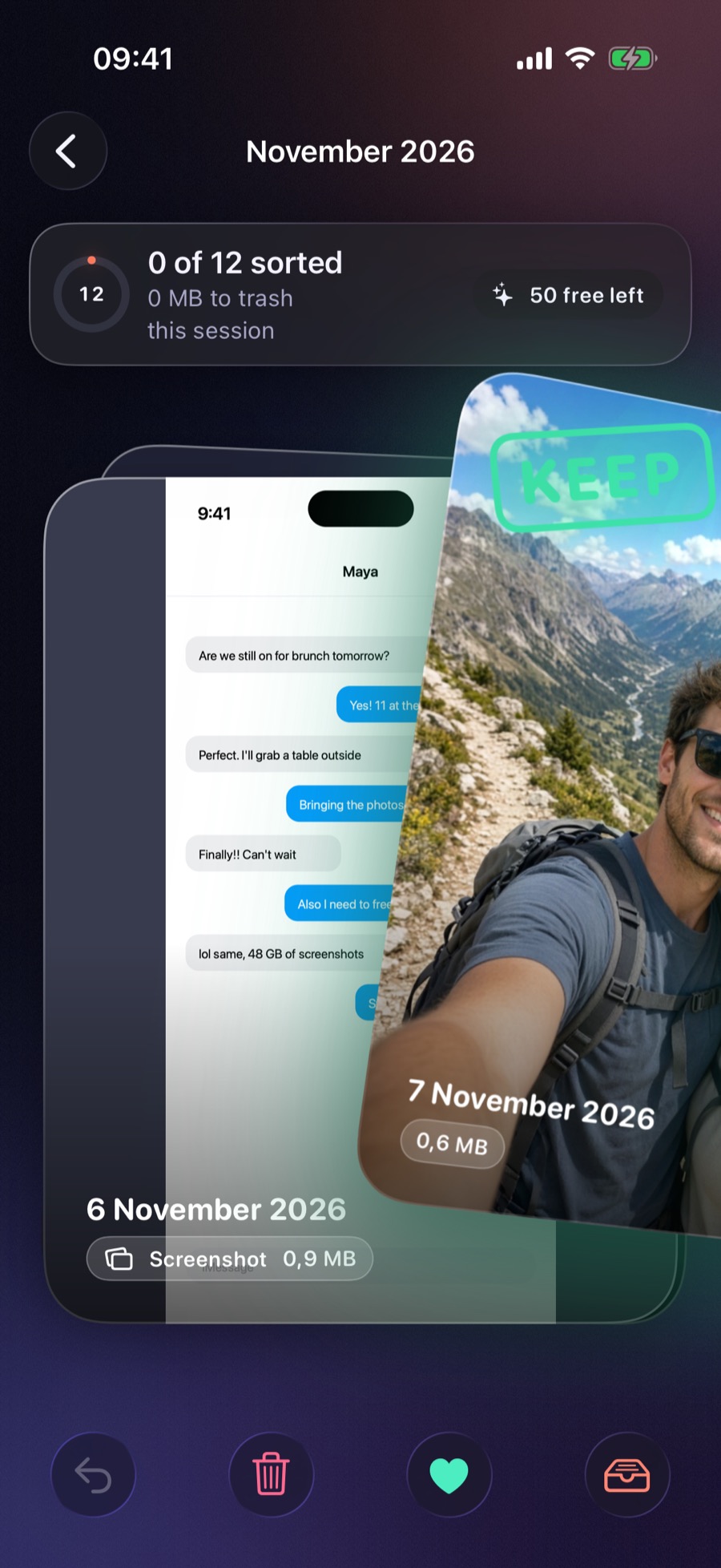
iPhone mid-swipe with green KEEP stamp and tilted card.
Mid-drag with 3D tilt & edge glow
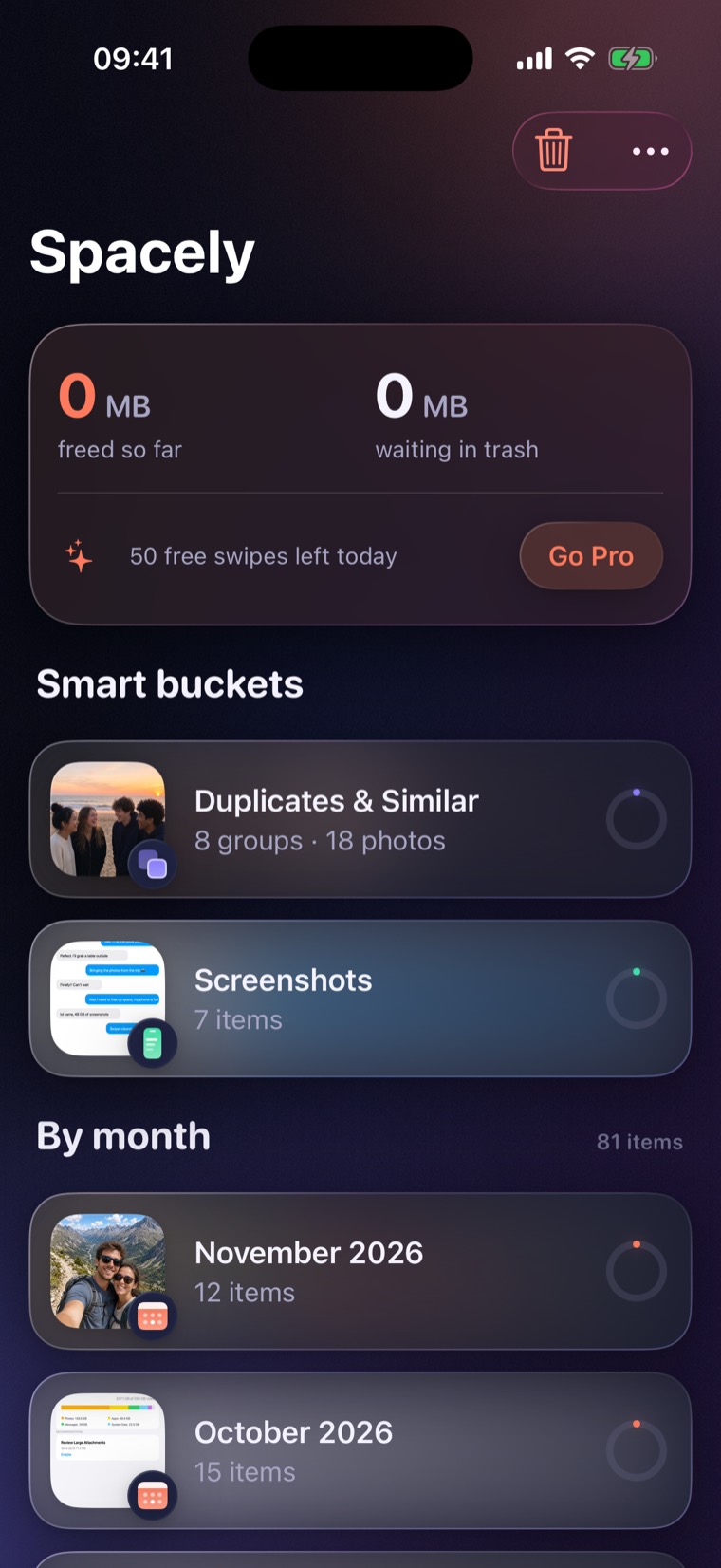
iPhone home screen showing space freed, free swipes left, smart buckets, and months.
Home dashboard & smart buckets
  • Bottom toolbar keeps Undo, Trash, Keep, and Review Trash in thumb reach
  • Next 3 cards pre-warmed in memory for 0 ms transitions
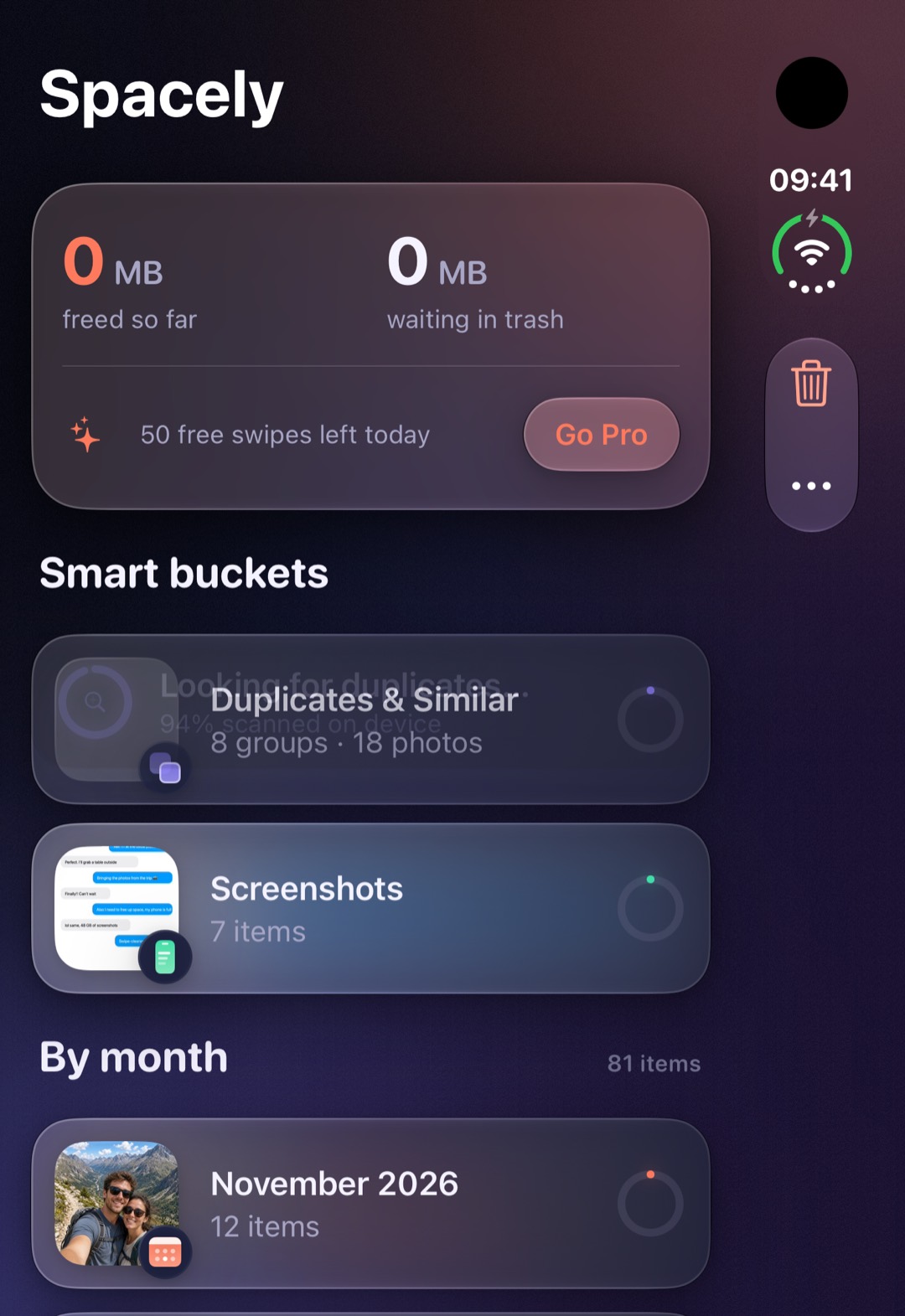
iPhone Duo · Folded

Outer display, side-column controls

Outer Cover Screen

Closed in your palm, iPhone Duo’s wider cover screen gives photos room to breathe while iOS and Spacely move the status bar and swipe actions into a vertical thumb rail on the right edge.

iPhone Duo folded outer display mid-swipe, with large photo card and right-side vertical action bar.
Outer display · Side-rail thumb controls
iPhone Duo folded outer display home screen scanning duplicates on device.
Outer display · Smart buckets & scan ring
  • Semantic toolbar placements automatically Dock to the trailing edge
  • Fold or unfold mid-pile without losing your current card or undo history
iPhone Duo · Unfolded Inner Display

Open it like a book. Buckets on the left, swipe deck on the right.

Unfold iPhone Duo and Spacely expands into a balanced two-column workspace. Pick Videos, Duplicates & Similar, Screenshots, or any calendar month on the left half while swiping full-size cards on the right half.

  • Fold-free card geometry: Reads GeometryProxy.reservedRegions so the photo card never sits across the physical crease.
  • Live session continuity: Owned by AppModel, so folding shut or opening wide mid-session keeps your exact card and undo stack intact.
  • Even-column grids: Trash and duplicate grids automatically snap to even column counts so thumbnails never split over the hinge.
NavigationSplitView ArrangementView ReservedRegion Aware
iPhone Duo unfolded inner display showing Smart Buckets including Videos, Duplicates, and Screenshots on the left pane, and the November 2026 swipe deck on the right pane.
iPhone Duo unfolded: left pane shows Smart Buckets (including the Video Cleaner); right pane keeps the 3D swipe deck clear of the center fold.

New · Video Cleaner

Videos eat the most storage. Clear the biggest ones first.

Ten forgotten 4K clips can take up more space than a thousand photos. Spacely pulls every video into a dedicated Videos smart bucket, sorted from largest byte size down.

Ranked Largest First

Reads real on-device resource sizes so a 600 MB 4K video or long screen recording appears on top of the deck first.

Instant Local Playback

The top card plays immediately from the local copy on your phone, muted by default with a one-tap speaker toggle. Never blocks on an iCloud download.

Screen Recording & iCloud Badges

Flags screen recordings, shows exact duration and MB/GB size on every card, and marks cloud-only originals with an In iCloud badge while keeping swiping instant.

3
Videos · Largest First 3 videos · 1.48 GB ready to review
Instant Local
Spacely Smart Buckets showing the Videos cleaner row at the top of the list.
● Screen recording 02:14 642 MB
1. 4K Screen Recording (02:14) 642 MB
2. Beach Sunset Clip (01:08) 490 MB
3. Out-of-focus Pocket Video (00:39) 350 MB

How Spacely Works

A tactile deck, not a grid of guilt.

Opening a 20,000-photo camera roll feels impossible. Picking one small pile — Videos, Duplicates, Screenshots, or November — takes two minutes.

  1. 01

    Pick a smart pile

    Start with Videos (largest first), Duplicates & Similar, Screenshots, or a single calendar month with its own completion ring.

  2. 02

    Swipe offline or online

    Right keeps. Left sets it aside in Trash. Every card loads instantaneously from your device — even on a plane with no signal.

  3. 03

    Review Trash, then free space

    Tap any item in Trash to restore it. When you tap Empty Trash, Photos deletes them locally and syncs to iCloud when you’re online.

Two-Step Safety

Trash first, restore with a tap

A left swipe never deletes on the spot. The photo or video waits in Trash with its exact size. Tap any tile to put it right back, or tap Empty Trash when you are sure.

Spacely Trash screen in dark mode with three photos, 1.1 MB ready to free, and Tap a photo to restore it.
Three items waiting in Trash. Nothing is gone until you confirm.
On-Device Perceptual Hash

Duplicates & burst shots, grouped

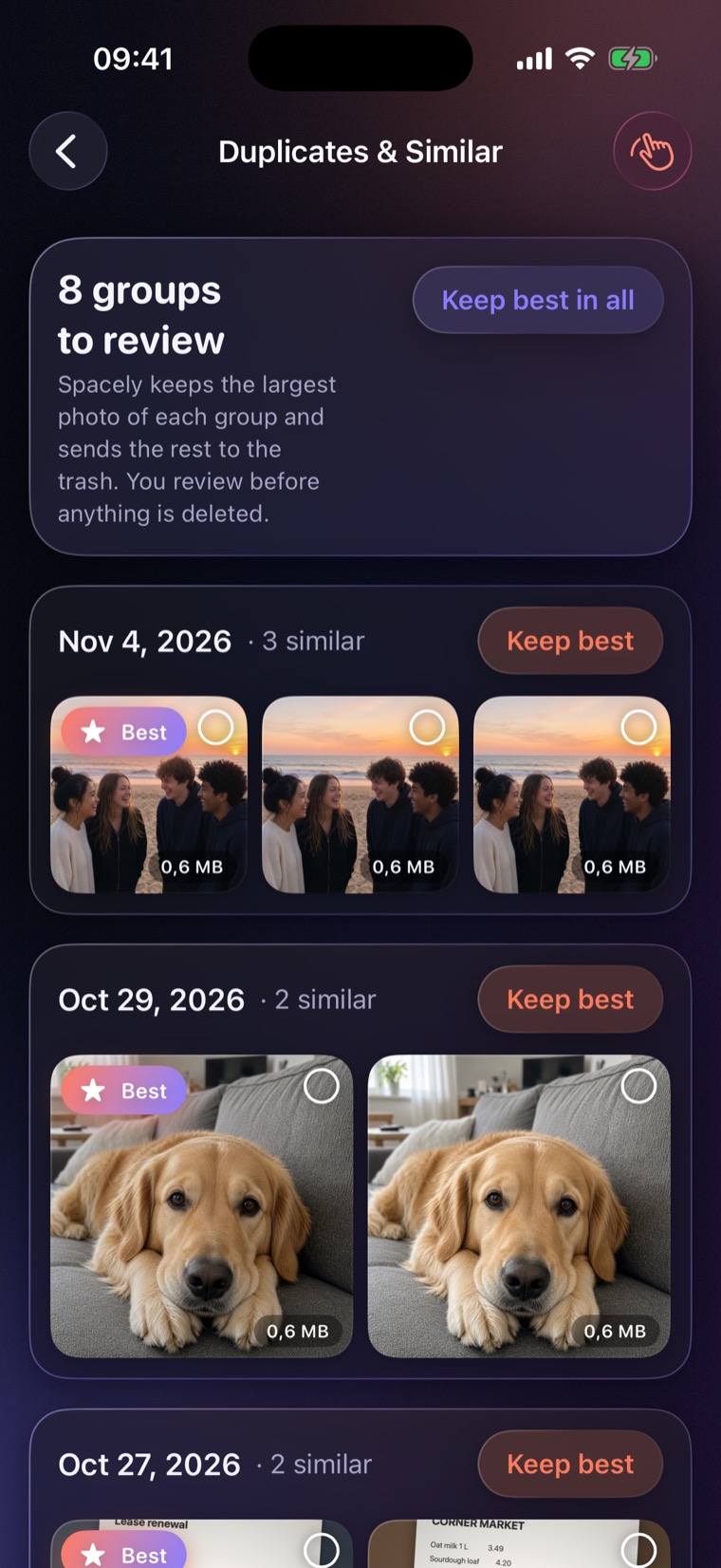
Spacely scans your library on the device using perceptual hashing and capture-time windows. It badges the largest frame as Best so one tap sends the rest to Trash.

Spacely Duplicates and Similar screen showing grouped near-duplicate photos, a Best badge, and Keep best buttons.
Same moment, three frames. Keep the best shot in one tap.

Honest Pricing

No $10-a-week traps. No ads.

Most photo cleaners lock you out on screen one or charge $9.99 a week. Spacely gives you 30 free swipes every single day, and Pro costs less than a coffee a month.

30

Free swipes every day — forever

Includes Videos, Duplicates, Screenshots, and every month. No account, no credit card, and no ads. Undo gives your swipe right back.

  • Yearly Best value · 7 days free

    $19.99 / year

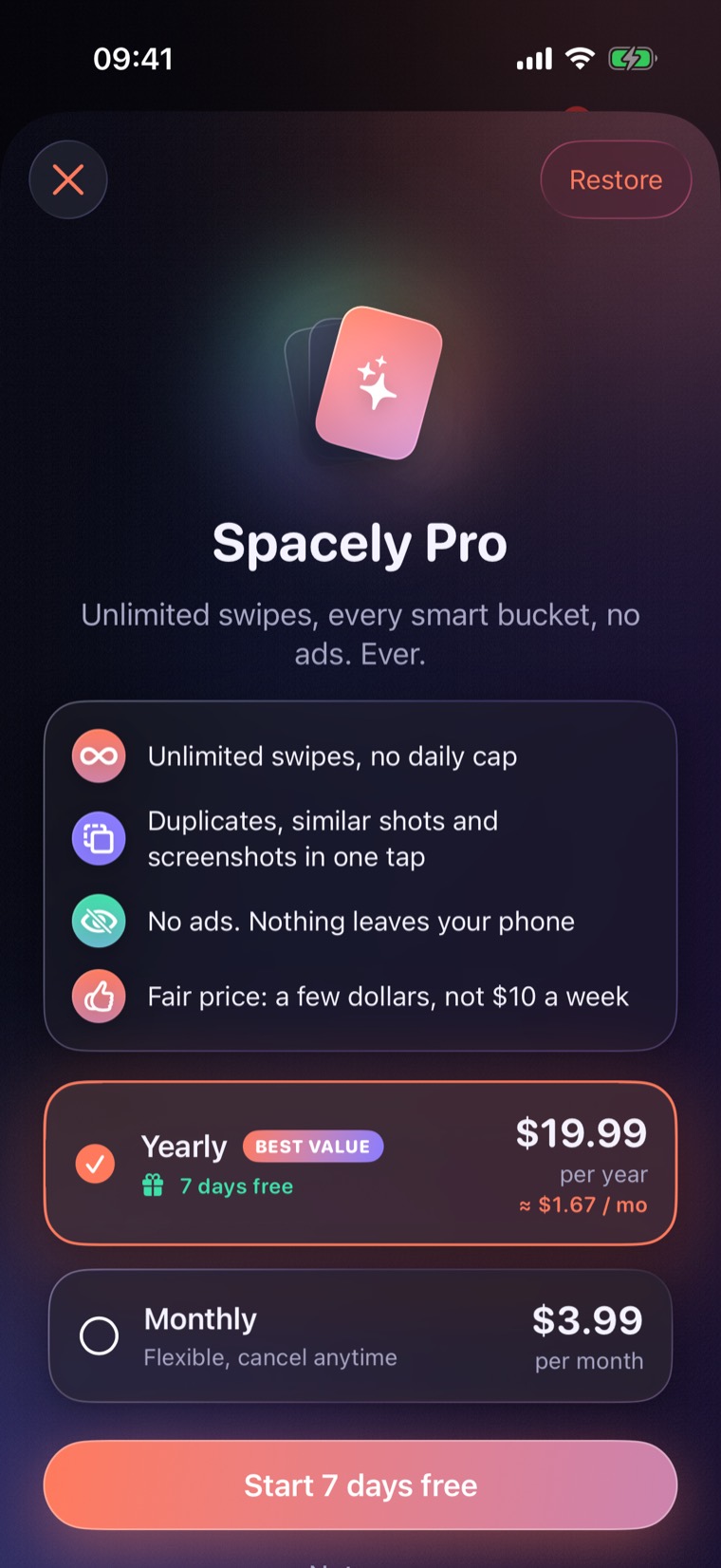
    7-day free trial, then $19.99 a year (about $1.67/month). Unlimited swipes in every bucket. Cancel anytime in App Store settings.

  • Monthly

    $3.99 / month

    Cleaning up before a trip? Subscribe for a single month and cancel anytime. No trial on this plan.

  • Lifetime One payment

    $34.99 once

    Pay once, own Spacely Pro forever with no recurring charges. Available right on the paywall via “Pay once instead”.

Prices in USD. Payment is charged to your Apple Account at confirmation of purchase, or when the 7-day yearly trial ends. Subscriptions renew automatically unless canceled at least 24 hours before the end of the current period. Manage or cancel anytime in App Store account settings.

Spacely Pro paywall in dark mode showing Yearly at $19.99 with 7 days free and Monthly at $3.99.
Clear pricing, visible close button, and one-tap Restore Purchases.

Privacy & Legal

Your photos and videos stay on your device.

No account. No server. No analytics SDKs. Spacely never uploads your library.

  • With your permission, Spacely reads photos and videos already on your device and deletes only what you confirm when emptying Trash.
  • Swipe cards load instantaneously from the local thumbnail on your device (including the local copy iCloud Photos keeps), so swiping works offline and never downloads originals just to display a card.
  • If your library is local, every action completes offline. If you use iCloud Photos, Apple syncs confirmed deletions the next time your device connects to the internet.
  • Keep/trash decisions, today’s swipe count, appearance preference, and the agreement version you accepted are stored only in local storage on your device.
  • Upon first opening the app, Spacely presents the Privacy Policy and Terms of Use (EULA) for your agreement. Both documents are always readable in Settings and on the dedicated Privacy page below.

Read the complete agreement that appears when you open Spacely. This website stores nothing: no cookies, no trackers, no analytics.

FAQ

Straight answers.

Does Spacely work offline and with iCloud Photos?

Yes. Swipe cards load instantaneously from the local image or thumbnail already on your device, whether you are online or in Airplane Mode. If your library is stored locally, every action completes offline. If you use iCloud Photos, deletions go through Apple’s Photos library and sync to iCloud automatically once your device is online.

How does the Video Cleaner work?

Spacely gathers all your videos into a dedicated Videos smart bucket and sorts them largest first so you can free the most gigabytes in a few swipes. The top video plays immediately from the local copy on your device (muted until you tap the speaker icon) and shows duration, file size, and whether it is a screen recording.

How does Spacely adapt between iPhone and iPhone Duo?

On iPhone, Spacely uses a one-handed portrait deck with a bottom action bar. On iPhone Duo folded (outer display), the photo stays large while the swipe controls move into a vertical column along the right edge. When you unfold iPhone Duo, Spacely opens a two-column split view with your buckets on the left and the swipe deck on the right, keeping cards clear of the fold.

When is a photo or video actually deleted?

Only when you open Trash, tap Empty Trash, and confirm the iOS system prompt. Until then, left-swiped items sit safely in Trash where a single tap restores them. Deleted items also remain in Apple’s Recently Deleted album for 30 days.

What do I get for free, and what does Pro cost?

You get 30 free swipes every day in every bucket — including Videos, Duplicates, Screenshots, and Months — with zero ads. Spacely Pro removes the daily limit for $3.99/month, $19.99/year (with a 7-day free trial), or a one-time $34.99 Lifetime unlock.

Ready on iPhone & iPhone Duo

Start with thirty free swipes today.

Clear your biggest videos, duplicate bursts, and old screenshots in minutes. No ads, no account, and nothing leaves your device.

Support

Need help?

Questions, bug reports, or purchase problems: email support@electro-elysium.org. To cancel a subscription or ask for a refund, use your App Store account settings or reportaproblem.apple.com.